
IE 11 is now available for download on Windows 7 and Windows 8 and comes automatically with Windows 8.1. Users that are using IE 11 who have not properly set compatibility mode will only have access to Maintenance Connection's Service Requester. This occurs because Microsoft has changed IE so it appears more like a Firefox browser to our servers. To have IE properly "announce" itself, your Maintenance Connection Site needs be added to Compatibility View.
Also, easy access to Compatibility View settings through the icon in the address bar has been removed making it more difficult to add a site to your compatibility list. However, we have outlined here what needs to happen if you encounter this problem.
Watch the video below or view the individual steps under the video.
Hint: Click the 4 arrows in the bottom right hand corner of the video to go full-screen.
- Right-click on an empty area of the IE title bar.

- Select "Menu bar"

- From the Menu bar that has now appeared, select Tools > Compatibility View Settings
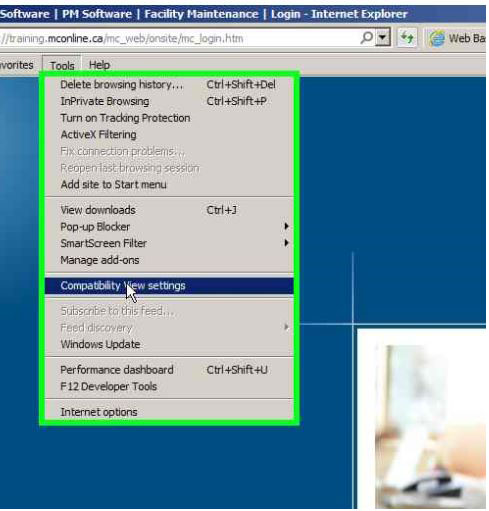
- Add the affected website to the list of sites

- Close and re-open Internet Explorer
Comments